Rear Entertainment In Plain Terms
Rear entertainment systems add screens, audio routing, and media controls for passengers who are not driving. A typical setup includes one or two displays, headphones or speakers, and a media source such as HDMI, USB, or a built-in streaming app. In many vehicles, the rear system shares power and sometimes the vehicle’s Wi‑Fi hotspot, so the experience depends on the car’s connectivity plan.
Trip time matters more than people expect. A 2-hour ride with kids often turns into 2.5 hours of “are we there yet,” especially when the seatback screen is missing or broken. Industry data from the U.S. National Highway Traffic Safety Administration shows child restraint use is a major factor in injury outcomes, and correct installation is easier when the rear cabin stays uncluttered.
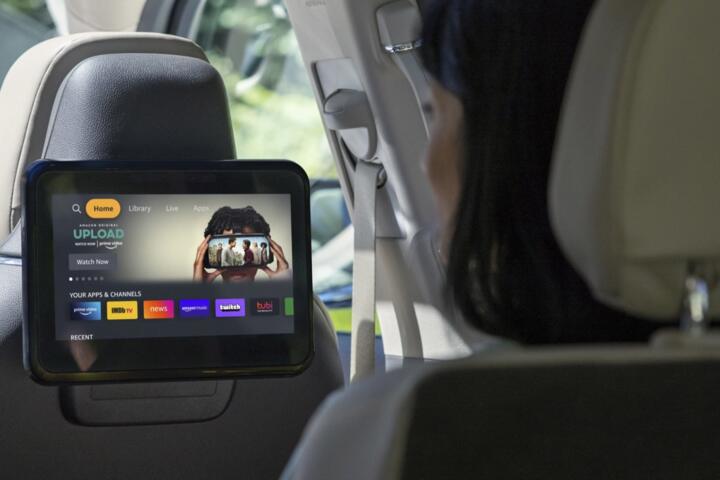
Also, screen brightness and mounting location affect glare. Many systems use 1080p panels, but the readable angle varies by brand and by how the headrest sits. Skip the idea that any rear screen is the same; mounting height and cable routing change what you can see from the front seats.
Vehicle type changes the tradeoffs. A three-row SUV can hide wiring behind trim, while a compact sedan may route cables closer to seat tracks. That difference shows up later as rattles, loose connectors, or a screen that loses power after a seat adjustment.
For reference, most modern cars use 12-volt accessories for infotainment power, while the displays and media hardware draw from the same electrical system. If you run a rear system for hours with the engine off, battery drain becomes a real risk, particularly on cold mornings.
What Buyers Get Wrong
People often shop for screen size and ignore how the system gets content. A rear display with only built-in apps can feel limited if the car’s data connection drops in rural areas. A system that depends on a phone hotspot can also burn through data plans faster than expected.
Another mistake is assuming the rear system improves safety. A screen can reduce boredom, but it also adds distractions for passengers and can tempt drivers to manage content. If the controls are hard to reach, the driver ends up doing more taps, which is the opposite of what families want.
Wiring and mounting are where the pain shows up. Seatback screens can interfere with child-seat straps, especially on models where the seatback has a fixed frame. In a real-world scenario, a family may install a rear-facing seat, then discover the screen mount blocks the tether path or changes the seat’s recline angle.
Consequences show up as money and time. Repairs for a failed display or a loose HDMI port can cost hundreds of dollars, and labor time varies because trim removal is slow work. If the system is integrated into the vehicle’s electronics, a dealer diagnostic may be required rather than a simple swap.
Finally, buyers underestimate how often content changes. Kids rotate between games, videos, and music, and a system that supports only one input type can become a bottleneck. That bottleneck turns into arguments over who controls the source, which is the part no spec sheet mentions.
Specific Ways To Get It Right
Match Inputs To Your Devices
Choose a rear system based on the media sources you already use. If your household relies on HDMI from a console or a streaming box, confirm the rear unit has HDMI ports or a supported adapter. If you mostly use USB drives, check whether the system reads common formats and whether it indexes folders slowly.
In practice, a system with two HDMI inputs can reduce unplugging. That matters when one child uses a tablet via USB and another uses a game console. A small aside: I’ve seen families label cables with masking tape because the ports sit behind a flap, and the flap never stays perfectly aligned.
Look for measurable behavior. Some systems take 20–40 seconds to boot after the car wakes, which affects how often you hear “it’s loading.” If you test, time the boot with the engine running and again after a short stop.
Plan For Headphones And Audio
Rear audio can be shared through speakers or through wireless headphones. Wireless headphones add convenience but require charging and pairing, and pairing can be finicky when multiple passengers use different devices. Wired headphones avoid pairing issues but create a cable management problem in tight cabins.
For road trips, check volume limits and whether the system supports separate audio channels. Some setups let the driver listen to the radio while rear passengers use the screen audio, but others route everything through the same audio bus. That difference changes whether the front cabin stays quiet.
Also, verify child-seat compatibility with headphone cables. A cable that drapes across the seat can interfere with harness routing, which is a safety concern. If you test, move the seat through its full travel range and watch for cable tension.
Check Wi-Fi And Data Limits
Built-in streaming depends on the vehicle’s connectivity method. If the system uses a cellular hotspot, confirm the data plan terms and whether the hotspot can be disabled. If it uses phone tethering, test coverage in the routes you actually drive.
Streaming consumes data quickly. A 1.5–2 hour video session can use multiple gigabytes depending on resolution, and that can matter if your plan is capped. If your car’s hotspot is billed separately, the cost can show up on the monthly bill rather than at purchase time.
Try a controlled test. On a day with known coverage, start a 10-minute stream and check whether playback stutters when you drive under bridges. If it stutters, the rear system becomes a frustration source.
Verify Screen Mounting And Glare
Mounting location affects both visibility and child-seat installation. Seatback screens can sit behind headrests, while overhead screens can reduce glare but may block roofline headroom. Confirm the viewing angle from the front seats and from the second-row seats.
Glare is not theoretical. Sunlight at low angles can wash out screens, and polarizing sunglasses can make it worse. Test at two times of day if possible, or at least simulate by parking facing the sun and checking legibility.
Also check how the screen affects seatback pockets. If the screen blocks a pocket, you lose storage for wipes, snacks, and charging cables. That storage loss can be a bigger daily annoyance than the screen itself.
Plan For Power And Battery Use
Rear systems draw power even when the car is off, depending on the vehicle’s electronics strategy. Some cars keep the rear screens active for a short period after shutdown, then shut them down to protect the battery. If you often stop for 30–60 minutes at a trailhead, test how long the system stays on.
Cold weather increases battery stress. A weak battery can cause the rear system to reboot or lose audio, which looks like a software fault. If the car has a 48-volt mild-hybrid system, the behavior can differ, but the safest approach is to test on your own battery condition.
Ask about warranty coverage for electronics. Many powertrain warranties do not cover infotainment hardware, so confirm the bumper-to-bumper term and whether it covers display assemblies.
Budget For Installation And Repairs
Factory systems often integrate with the vehicle harness, while aftermarket systems may add wiring and adapters. Aftermarket kits can work, but they can also create intermittent issues when trim flexes or when seat motors move. If you buy used, ask whether the system was installed by the dealer or by a third party.
Repair frequency varies by design. Displays are mechanical assemblies with backlights and connectors, and connectors can loosen if the harness was routed near seat tracks. If you hear a rattle after seat movement, that points to cable tension rather than a “software update” problem.
For ownership costs, treat the rear system like a separate electronics module. Even a single failed component can require labor-intensive trim removal, and parts pricing can be high because the display is not a universal item.
Use Controls That Don’t Pull The Driver In
Driver distraction is a practical issue, not a theory. If the rear system’s source selection is only reachable from the front, the driver ends up managing content. Look for rear passenger controls, steering-wheel audio controls that do not change rear content, and a lockout mode for the driver.
In practice, a “rear controls only” mode reduces interruptions. Some systems also support quick profiles, which helps when one child’s account has different parental controls. A small aside: on one vehicle I reviewed, the rear system remembered the last input, which sounds minor until you switch from HDMI to USB and it keeps trying to play the old source.
Test the control flow. Change sources while the car is moving slowly in a safe area, then see whether the screen freezes or whether audio cuts for more than a few seconds.
Mini Case Examples With Numbers
A fleet manager running a small shuttle service faced constant complaints about “bored passengers” on 45–60 minute routes. The company installed a dual-screen rear system with HDMI inputs and wireless headphones for two rows, then standardized on a single media source: a tablet docked in a rear mount. After 3 months, complaints dropped from 14 per month to 5 per month, and the driver reported fewer requests to change content mid-route.
Costs were not just hardware. The fleet spent about $1,200 on installation and $250 on replacement headphone sets over the first quarter, mainly due to lost or damaged ear pads. The bigger cost came from downtime: one display needed service after 9 months, and the vehicle was out of rotation for about 2 days while parts arrived.
In a second case, a family with a compact SUV bought a used vehicle with an aftermarket overhead screen. The system worked until the seatback moved for a different child-seat setup, then the HDMI connection became intermittent. They rerouted the harness away from the seat track and added slack, which fixed the issue, but it took a full afternoon and a trim removal session that they could not do on a quick weekend.
After the fix, the family stopped using the phone hotspot and switched to offline media on a USB drive. That reduced playback dropouts during a 300-mile road trip, and it avoided data overages that had been showing up on the phone bill.
Checklist For Buying Rear Systems
| Check | What To Look For | Why It Matters | Test Before Buying |
|---|---|---|---|
| Inputs | HDMI, USB, audio jack | Prevents source bottlenecks | Plug in your device and switch sources |
| Audio | Speakers vs headphones | Front cabin noise control | Pair headphones and confirm volume behavior |
| Connectivity | Hotspot plan or tether | Avoid streaming dropouts | Test playback in weak-signal areas |
| Child Seats | No strap interference | Correct installation matters | Install your seat and check recline |
| Power | How long it runs off | Prevents battery drain | Run 30 minutes with engine off |
| Warranty | Coverage for displays | Electronics repairs can be costly | Confirm term and exclusions in writing |
Common Mistakes And Fixes
Buying for screen size only is a common trap. Bigger panels can sit at worse angles, and glare can erase the advantage. Avoid it by checking legibility from the second-row seats and from the front seats, then verify that the screen does not block child-seat tether routing.
Skipping the input test causes the next problem. A system that reads only one file type can force you to re-encode videos, which is work you do not want on a trip week. Avoid it by playing a file from your USB drive and confirming the system’s supported formats and folder behavior.
Ignoring headphone logistics becomes annoying fast. Wireless headphones require charging, and some models pair slowly after the car has been parked overnight. Avoid it by asking for the exact headphone model and checking whether the system supports multiple headphone pairs at once.
Overestimating offline capability leads to dead time. If the built-in apps require a data connection, the rear screens turn into static displays when coverage drops. Avoid it by downloading content ahead of time and confirming whether the system can play it without a live connection.
Assuming warranty coverage is automatic can cost money. Many electronics fall under limited coverage, and labor for trim removal can be billed separately. Avoid it by reading the warranty exclusions and asking the service department how they diagnose a failed display.
FAQ
Do Rear Screens Drain The Battery?
They can, depending on the vehicle’s electronics strategy. Many cars shut down infotainment and rear displays after a short period with the engine off, but the exact time varies by model and battery condition. If you often park for 30–60 minutes with the engine off, test it before you rely on it. A weak battery can also cause rebooting or audio dropouts. If the car has a history of battery replacements, treat the rear system as a higher drain load and consider a battery health check.
Will Rear Entertainment Interfere With Child Seats?
It can, especially with seatback-mounted screens. The screen bracket may limit seatback recline, block strap routing, or interfere with tether anchors. Avoid surprises by installing your exact child seat in the target position and checking harness routing with the screen in place. If you use a rear-facing seat, confirm that the screen mount does not push the seat into a less-than-approved recline angle. When in doubt, ask the dealer for the child-seat fit guide for that specific trim and rear screen option.
What Inputs Should I Prioritize?
Prioritize the inputs you actually use. HDMI is common for consoles and some media players, while USB is common for offline video libraries. If your household uses tablets, confirm whether the rear system supports USB audio/video or whether you’ll rely on Bluetooth audio. Check whether the system supports common video formats and whether it resumes playback after power cycles. In practice, a system that supports only one input type can force constant unplugging, which becomes a daily annoyance.
How Much Data Does Streaming Use?
Streaming data use depends on resolution and compression, but it often reaches multiple gigabytes over a couple of hours. If the vehicle uses a cellular hotspot, the data plan terms matter as much as the screen. If the car uses phone tethering, the phone bill becomes the cost center. Avoid surprises by running a short stream test and checking your data usage on the hotspot or phone. For long trips, offline playback on USB can reduce both data use and buffering when signal drops.
Are Aftermarket Rear Systems Reliable?
Some aftermarket systems work well, but reliability depends on installation quality and integration with the vehicle’s wiring and trim. Poor cable routing near seat tracks can cause intermittent video or power loss when seats move. Aftermarket units may also lack the vehicle’s diagnostic integration, so troubleshooting can take longer. If you buy used, inspect for loose connectors and check that the system works through seat adjustments. Ask whether the installer used OEM-style connectors and whether the kit has a warranty that covers the display assembly.
Author's Insight
Rear entertainment systems add friction points as much as they add comfort. The biggest variables are input support, connectivity behavior, and how the mounting interacts with seat movement and child-seat installation. A system that looks good on a showroom bench can fail in daily use if cables sit where seat tracks flex or if the hotspot plan has strict data limits.
For buyers, the most useful step is a controlled test: plug in your device, run 10 minutes of playback, then switch inputs and adjust seats. If the system reboots, freezes, or loses audio, that pattern usually repeats on road trips.
Warranty coverage matters because display repairs often require trim removal. If you can’t get clear coverage terms in writing, treat the rear system as a higher-risk electronics purchase.
Key Takeaways
Rear entertainment systems can reduce passenger boredom, but they also add electronics, wiring, and potential battery drain. Choose based on inputs, audio routing, and child-seat fit, not just screen size. Test the system with your actual media source and confirm how it behaves when the car is parked for 30–60 minutes.
For ownership, budget for possible headphone replacements and plan for display service that may take time. If the system depends on cellular streaming, check data plan limits and test playback in weak-signal areas before a long trip.
Seek professional help if you notice repeated screen rebooting, burning smells, or persistent electrical faults after seat movement. Those symptoms can point to wiring damage or a failing connector, and a shop can inspect the harness routing and connectors safely.